
Thermostat technology is the control system that measures your home’s air temperature, compares it to a target setpoint, and tells your heating or cooling equipment when to run and when to stop. That one function sits at the center of every HVAC system, whether you have a 40-year-old bimetallic dial or a Wi-Fi-connected smart model. ENERGY STAR-certified smart thermostats average about 8% in annual HVAC bill savings, and U.S. households spend over $900 a year on heating and cooling on average, so even modest improvements add up fast. Ultraairswfl helps Southwest Florida homeowners navigate exactly these decisions every day.
Here is what this guide covers:
- How thermostats actually work (the closed-loop control loop, sensors, and switching)
- The main thermostat types and which fit your situation
- Smart features, energy savings, compatibility, placement, and when to call a pro
Table of Contents
- How does thermostat technology work?
- What are the main types of thermostat systems?
- What does smart thermostat technology actually add?
- What energy savings can you realistically expect?
- Is your home wired for a smart thermostat?
- Where should you mount your thermostat?
- Common thermostat problems and when to replace
- What the research actually says about thermostat savings
- How thermostat technology evolved over time
- Security and privacy considerations for smart thermostats
- Key Takeaways
- What HVAC pros actually recommend on thermostat upgrades
- Useful sources for homeowners who want to dig deeper
How does thermostat technology work?
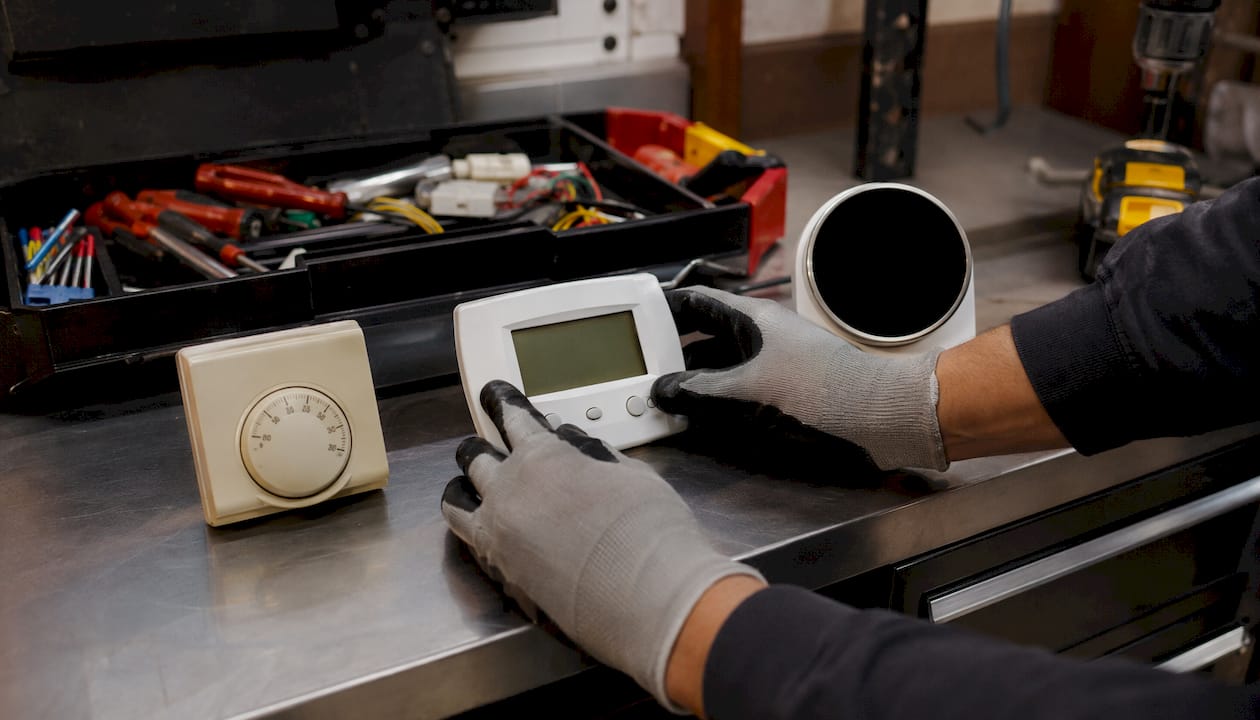
Every thermostat, from the simplest dial to the most advanced smart model, runs the same three-step loop: sense the temperature → compare it to your setpoint → signal the HVAC system to run or stop. This is called closed-loop feedback control, and it is what keeps your home from swinging wildly between too hot and too cold.
The sensing side varies by thermostat generation:
- Bimetallic strip: Two bonded metals expand at different rates as temperature changes, physically bending to open or close a circuit. Standard in older mechanical thermostats.
- Gas-filled bellows: A sealed chamber of gas expands with heat, pushing a diaphragm to trigger switching. Less common today but still found in some legacy systems.
- Thermistors: Semiconductor resistors whose electrical resistance changes with temperature. Used in most digital and smart thermostats for fast, accurate readings.
- Silicon IC sensors: Integrated circuits that output a voltage proportional to temperature. Found in higher-end digital and smart models.
On the switching side, older thermostats use mechanical contacts or relays to complete a low-voltage circuit that starts the furnace or air handler. Digital and smart models use solid-state switching (triacs or transistors) controlled by a microcontroller, which also handles schedules, Wi-Fi, and learning algorithms.
The three-step control loop: A thermostat senses ambient temperature, compares it to the setpoint you chose, and sends a signal to your HVAC equipment to run until the gap closes. That cycle repeats continuously, all day, every day.
A few terms you will see on any thermostat: setpoint is your target temperature; deadband (or hysteresis) is the small range around the setpoint where the system stays off to prevent constant short-cycling; and heat anticipator is a small resistor in older mechanical models that shuts the heater off slightly early to prevent temperature overshoot. If your old thermostat seems to cut heat before reaching your setpoint, that is normal behavior, not a fault.
What are the main types of thermostat systems?
The right thermostat comes down to one question: how much automation do you actually want? The five main categories range from a simple on/off dial to a system that learns your schedule and adjusts itself.
| Type | Typical Cost | Key Features | Installation | Best For |
|---|---|---|---|---|
| Mechanical (bimetallic/gas-bulb) | — | Manual dial, no programming | Simple | Rental units, basic heat-only systems |
| Non-programmable digital | — | LCD display, precise setpoint | Simple | Homeowners who prefer manual control |
| Programmable | — | Day/time schedules, multiple setpoints | Moderate | Regular schedules, budget-conscious upgrades |
| Smart (Wi-Fi connected) | — | App control, learning, geofencing, alerts | Moderate to complex | Tech-comfortable homeowners, energy savers |
| Zoning controls | — | Multiple thermostats, damper control | Professional | Multi-level homes, rooms with comfort imbalance |
- Mechanical thermostats work fine for simple, single-stage systems where you just want heat or cool on a dial. No batteries, no screens, no setup.
- Non-programmable digital models give you a precise digital readout and a clean interface without any scheduling complexity.
- Programmable thermostats let you set different temperatures for morning, day, evening, and night across the week. A well-programmed unit can match smart thermostat savings if you actually follow through on the programming.
- Smart thermostats add Wi-Fi, remote app control, learning algorithms, and geofencing. The practical advantage over programmable models is automation: the system adjusts itself so you do not have to remember.
- Zoning controls pair multiple thermostats with motorized dampers in your ductwork to condition different areas of your home independently. If your second floor is always 5°F hotter than the first, HVAC zoning is the fix a single thermostat cannot provide.
Learning thermostats and remote-sensor systems sit within the smart category. Learning models observe your manual adjustments over about a week and build a schedule automatically. Remote sensors let the thermostat read temperature from a room other than where it is mounted, which solves hot-spot and cold-spot problems without a full zoning install.
What does smart thermostat technology actually add?
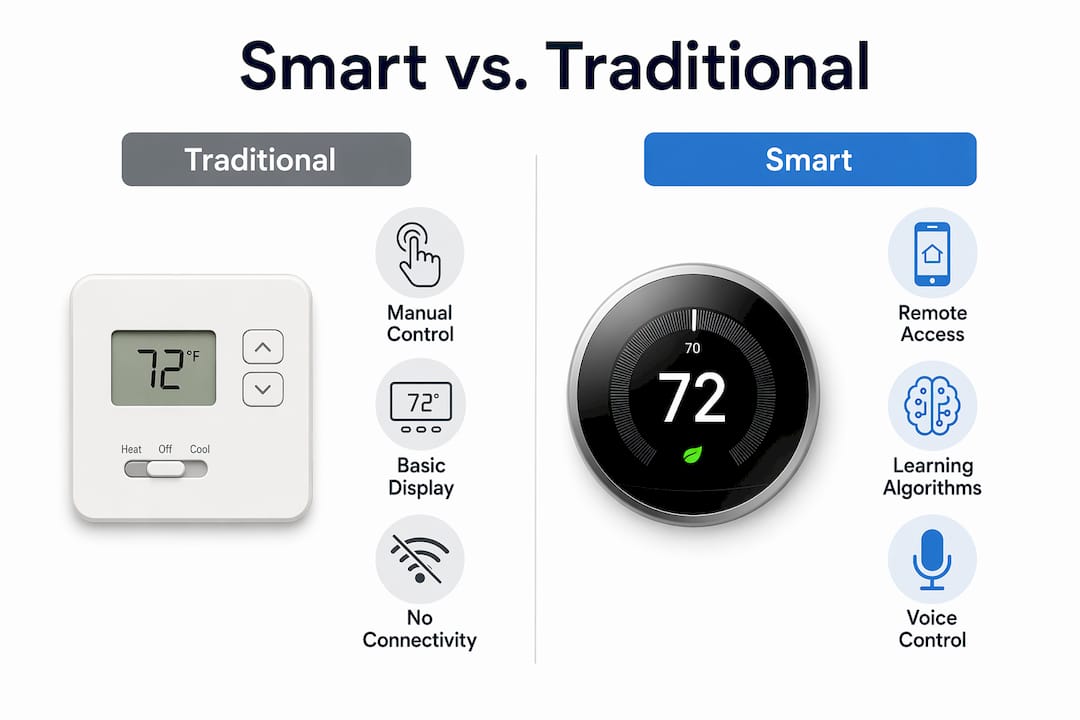
A smart thermostat is an internet-connected device that combines automation, analytics, and remote access in one unit. The Wi-Fi connection is the foundation; everything else builds on it.
Standard features you will find across most smart models:
- Remote control via app: Adjust temperature from anywhere, useful when your schedule changes unexpectedly.
- Custom schedules: Set different temperatures by time of day and day of week, with no manual intervention once configured.
- Geofencing: The thermostat detects when your phone leaves or approaches home and adjusts temperature automatically, cutting waste when the house is empty.
- Learning algorithms: The thermostat tracks your manual adjustments and builds a schedule over time. Note that learning requires stable patterns — homeowners with highly variable schedules often see limited additional benefit from this feature specifically.
- Remote sensors: Satellite sensors in other rooms feed temperature data back to the thermostat, improving whole-home comfort.
- Maintenance alerts: Notifications for filter changes, unusual runtime, or system faults before they become expensive repairs.
- Energy reports: Weekly or monthly summaries showing runtime, setpoint history, and estimated savings.
Smart thermostats also connect to platforms like Amazon Alexa, Google Home, and Apple HomeKit for voice control, and they can participate in utility demand-response programs. In a demand-response event, your utility asks enrolled thermostats to raise the setpoint by a degree or two during peak grid demand, usually in exchange for a bill credit. Participation is voluntary and the adjustment is small enough that most homeowners do not notice it. For a broader look at how these devices fit into a connected home, HVAC automation examples show real integration scenarios.
Pro Tip: Learning algorithms need at least one to two weeks of consistent manual adjustments to build a useful schedule. If you install a learning thermostat and immediately leave for vacation or shift your routine, the model will learn the wrong pattern. Set a manual schedule first, then let the learning layer refine it.
What energy savings can you realistically expect?
ENERGY STAR-certified smart thermostats average about 8% in annual HVAC bill savings, with some utility studies showing higher ranges in select cases. With U.S. households spending over $900 a year on heating and cooling on average, 8% translates to roughly $72 per year, and higher savings are possible in certain climates.
| Savings Driver | Lower-End Outcome | Higher-End Outcome |
|---|---|---|
| Climate (mild, few extremes) | 8% | — |
| Climate (hot summers + cold winters) | — | higher |
| Well-insulated, tight home | Savings captured fully | — |
| Leaky ducts or poor insulation | Savings largely lost | — |
| Replacing a non-programmable thermostat | Higher relative gain | — |
| Replacing an already-programmed thermostat | Smaller marginal gain | — |
| Consistent occupancy schedule | Full learning benefit | — |
| Irregular schedule | Limited learning benefit | — |
For a quick payback estimate: take the thermostat’s purchase price for a quality smart model, divide it by your expected annual savings in dollars. Payback periods vary depending on local energy rates and usage. Journalist and utility payback calculators confirm that real-world payback periods vary from under two years to over five, depending on local energy rates and how aggressively the thermostat is used. For Southwest Florida homeowners, where air conditioning runs most of the year, the role of smart thermostats in energy savings is especially pronounced because the HVAC system rarely gets a seasonal break.
Is your home wired for a smart thermostat?
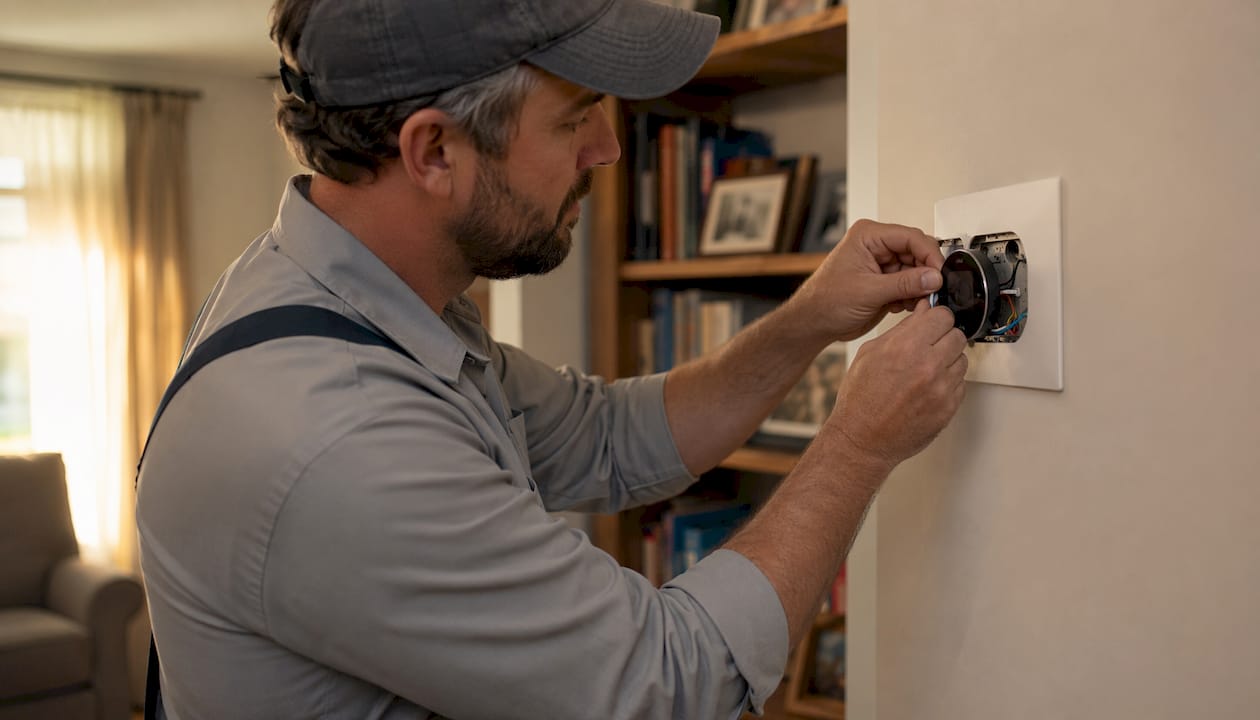
Not every home is ready for a smart thermostat out of the box. The most common obstacle is the C-wire (common wire), which provides continuous 24V power to keep a smart thermostat running. Many homes built before the 1990s have only four wires at the thermostat, with no C-wire. Smart thermostats require a C-wire for reliable operation, and running one or installing a power-extender adapter is often the first thing an installer addresses.
Pre-install checklist before you buy:
- Count the wires at your current thermostat and note their terminal labels (R, G, Y, W, C).
- Confirm whether your system is single-stage or multi-stage (two-stage heating or cooling requires a compatible thermostat).
- Identify whether you have a heat pump — heat pumps use different wiring (O/B reversing valve wire) and need a thermostat that explicitly supports them.
- Check for existing zoning controls; adding a smart thermostat to a zoned system requires compatibility verification.
- Note the location of your air handler or furnace to assess whether running a new wire is feasible.
Pro Tip: If your system has no C-wire, you have two options: a power-extender kit (sometimes called a power adapter or “add-a-wire” adapter) that repurposes an existing wire, or having a technician run a new C-wire from the air handler. Power-extender kits work in many cases but can cause intermittent issues on some systems. When in doubt, running a new wire is the cleaner long-term solution.
Simple thermostat swaps on a standard single-stage system with existing C-wire wiring are reasonable DIY projects for a handy homeowner. Anything involving heat pumps, multi-stage systems, zoning, or missing wires is worth a call to a licensed HVAC technician. Ultraairswfl handles C-wire runs and full thermostat installations across Naples, Cape Coral, and Fort Myers. For local repair and installation options, heating repair in Cape Coral and Naples covers what to expect.
Where should you mount your thermostat?
Placement determines accuracy. A thermostat mounted in the wrong spot will read a temperature that does not reflect what the rest of your home actually feels like, and your HVAC system will respond to a ghost reading.
Do:
- Mount on an interior wall, roughly 5 feet from the floor.
- Choose a central location that represents the most-used living areas.
- Keep it near a return-air path so it samples well-mixed room air.
Don’t:
- Place it near windows, exterior doors, or skylights (direct sunlight skews readings high).
- Mount it above or beside supply vents (conditioned air blowing directly on the sensor causes short-cycling).
- Put it in a hallway that stays closed off from the main living area.
- Install it near the kitchen, laundry room, or any heat-generating appliance.
Pro Tip: If one room is always too hot or too cold despite a correctly placed thermostat, a remote sensor is often the right fix. Most smart thermostats support one or more add-on sensors that you place in the problem room. The thermostat then averages or prioritizes that room’s reading, which solves comfort imbalance without a full zoning install. For more on accessories that improve whole-home comfort, HVAC accessories for home comfort is worth a look.
Common thermostat problems and when to replace
Most thermostat issues are simple. Dead batteries, a tripped circuit breaker, or the system left in the wrong mode (heat vs. cool) account for a large share of service calls. Check those first before assuming the thermostat has failed.
Common problems and quick fixes:
- Blank screen: Replace batteries or check the breaker. If the screen stays dark, the thermostat may have lost power due to a wiring issue.
- Temperature reads inaccurate: Dust inside the thermostat can insulate the sensor. Open the cover and blow it out gently. Also verify placement (see above).
- Short-cycling (system turns on and off rapidly): Often a dirty filter restricting airflow, an oversized system, or a misconfigured deadband setting.
- Lagging response: On older mechanical models, a dirty bimetallic strip can slow response. On smart models, check Wi-Fi signal strength at the thermostat location.
- Wi-Fi drops repeatedly: Router distance, 2.4 GHz vs. 5 GHz band mismatch, or a firmware update pending on the thermostat.
Signs it is time to replace the thermostat rather than troubleshoot it:
- The unit is more than 10 years old and showing erratic behavior.
- Your HVAC system was recently upgraded to a multi-stage or heat pump system and the old thermostat is not compatible.
- You have no scheduling features and your energy bills are higher than they should be.
- The thermostat cannot maintain a consistent temperature despite a healthy HVAC system.
When the thermostat checks out fine but comfort problems persist, the issue is usually the HVAC system itself. Ultraairswfl offers diagnostics across Southwest Florida. An HVAC maintenance checklist can help you identify what to flag before a technician arrives.
What the research actually says about thermostat savings
The ENERGY STAR average of 8% is a real figure, but it is an average across a wide range of homes, climates, and usage patterns. Some studies report higher savings in regions with strong seasonal extremes. Homes in mild climates with HVAC systems that rarely run see much smaller gains.
The single biggest limiter of thermostat savings is not the thermostat itself. If your ducts leak, your attic is under-insulated, or your air handler is 15 years old and running at reduced efficiency, a new thermostat is adjusting the controls on a system that cannot respond efficiently. Physical improvements to the building envelope often deliver more savings per dollar than the thermostat upgrade alone.
Consumer Reports testing reinforces this: smart thermostats are often worthwhile, but user behavior, existing programmable thermostats, and climate are the dominant drivers of ROI. A homeowner who already runs a well-programmed schedule on a standard programmable thermostat will see smaller marginal gains from switching to a smart model than someone upgrading from a manual dial.
Pro Tip: Schedule an HVAC tune-up at the same time you install a new thermostat. A technician can verify refrigerant charge, clean coils, and check duct integrity. That combination, a well-calibrated system plus a properly configured thermostat, is where the real savings show up. Monitoring HVAC health over time keeps those gains from eroding.
How thermostat technology evolved over time
The thermostat has a longer history than most homeowners realize. Warren Johnson patented the first electric room thermostat in 1883, and the Smithsonian Institution holds examples of early pneumatic and bimetallic control devices from that era. The bimetallic coil thermostat, which became the standard residential design for most of the 20th century, works on a principle that has not changed: two metals bonded together bend predictably as temperature changes, opening or closing a circuit.
The programmable thermostat arrived in the 1970s and 1980s, driven partly by the energy crises of that decade. By the 1990s, digital displays and microcontrollers replaced mechanical contacts in most new installations. The real shift came in the early 2010s when Wi-Fi-enabled smart thermostats brought remote access, learning algorithms, and utility integrations to the residential market. Today, major HVAC manufacturers including Trane, Carrier, and Daikin all offer compatible smart thermostat lines designed to work with their variable-speed and multi-stage equipment, where precise control delivers the most efficiency gains.
Security and privacy considerations for smart thermostats
A smart thermostat is a connected device on your home network, which means it carries the same security responsibilities as any other smart home product. The thermostat collects occupancy data, schedule patterns, and sometimes location data through geofencing. That information is stored on manufacturer servers and, in demand-response programs, shared with your utility.
Practical steps to protect your setup:
- Use a strong, unique Wi-Fi password and keep your router firmware updated.
- Enable two-factor authentication on the thermostat’s app account if the manufacturer supports it.
- Review the privacy policy before enrolling in demand-response or utility-sharing programs to understand what data leaves your home.
- Keep thermostat firmware updated. Manufacturers push security patches through firmware updates, and skipping them leaves known vulnerabilities open.
- Segment your network if you have a router that supports a separate IoT network. Keeping smart home devices on a separate SSID limits exposure if one device is compromised.
The data risk from a thermostat is lower than from a security camera or a smart lock, but occupancy patterns are genuinely sensitive information. Knowing when a home is empty is useful to a thermostat and, potentially, to anyone who should not have that data.
Key Takeaways
Thermostat technology controls your home’s comfort and energy use through a continuous sense-compare-signal loop, and upgrading to a smart model delivers the most savings when the underlying HVAC system is in good shape.
| Point | Details |
|---|---|
| Core function | A thermostat senses temperature, compares it to your setpoint, and signals HVAC equipment to run or stop. |
| Smart thermostat savings | ENERGY STAR-certified models average 8% annual HVAC bill savings; higher savings are possible in favorable conditions. |
| Check the C-wire first | Many older homes lack a C-wire; confirm wiring compatibility before purchasing a smart thermostat. |
| Pair with a tune-up | A thermostat upgrade delivers the most savings when paired with a system tune-up and duct or insulation checks. |
| Call a pro for complexity | Heat pumps, multi-stage systems, zoning, and missing wires require a licensed HVAC technician, not a DIY swap. |
What HVAC pros actually recommend on thermostat upgrades
The first thing a contractor checks is not which thermostat you want. It is whether your system is healthy enough to benefit from one. A smart thermostat on a system with a failing capacitor, a dirty evaporator coil, or leaky supply ducts will dutifully run schedules and report energy data while the underlying inefficiency eats your savings.
Here is what experienced installers consistently recommend:
- Schedule a tune-up before or alongside the thermostat install. Verified refrigerant charge, clean coils, and confirmed airflow mean the new thermostat is controlling a system that can actually respond to its signals.
- Verify the C-wire situation before you buy. Discovering you need a new wire after the thermostat is already on your wall adds a service call that could have been bundled with the install.
- Consider zoning for multi-level homes. A single thermostat on the first floor of a two-story home in Southwest Florida will always fight the physics of heat rising. Zoning addresses the root cause; a smarter thermostat just manages the symptom.
- Prioritize envelope improvements for older homes. If your attic insulation is thin or your doors and windows leak, improving energy efficiency through building-envelope upgrades often delivers better ROI than any thermostat upgrade alone.
- Match the thermostat to the system. Trane, Carrier, and Daikin all publish compatibility guides for their equipment. Using a manufacturer-matched thermostat on a variable-speed system unlocks features that a generic smart thermostat cannot access.
Ultraairswfl provides thermostat installation, C-wire runs, and full system diagnostics across Naples, Cape Coral, and Fort Myers. If you are weighing a thermostat upgrade alongside a broader system review, heating solutions from Ultraairswfl is the right starting point. For homeowners who want to understand their full system options before committing, the heating system options guide covers the decision from the ground up.
Useful sources for homeowners who want to dig deeper
- ENERGY STAR Smart Thermostats: The certification criteria and savings data behind the 8% average figure; useful for verifying which models qualify for utility rebates.
- Bryant: How Does a Thermostat Work?: A manufacturer explainer covering wiring, C-wire requirements, and system compatibility in plain language.
- Consumer Reports: Are Smart Thermostats Worth It?: Independent testing and analysis of real-world savings, including the behavioral and climate factors that drive variance.
- Efficiency Vermont: Is a Smart Thermostat Worth Buying?: Honest assessment of savings limits and when physical improvements matter more than the thermostat.
- U.S. Energy Information Administration: Residential Energy Consumption: National data on household heating and cooling expenditures, useful for benchmarking your own bills.
- HowStuffWorks: How Thermostats Work: Accessible explanation of mechanical thermostat operation, including the heat anticipator and bimetallic strip.
- Ultraairswfl: Best Smart Thermostat for Florida Humidity: Localized guidance for Southwest Florida homeowners choosing a thermostat that handles high humidity and near-year-round cooling loads.